
Office rental in Phuket: a page built for SEO and AI, recommended by ChatGPT, Perplexity and Yandex Alice five weeks later
The challenge: an office rental page for Google and AI assistants
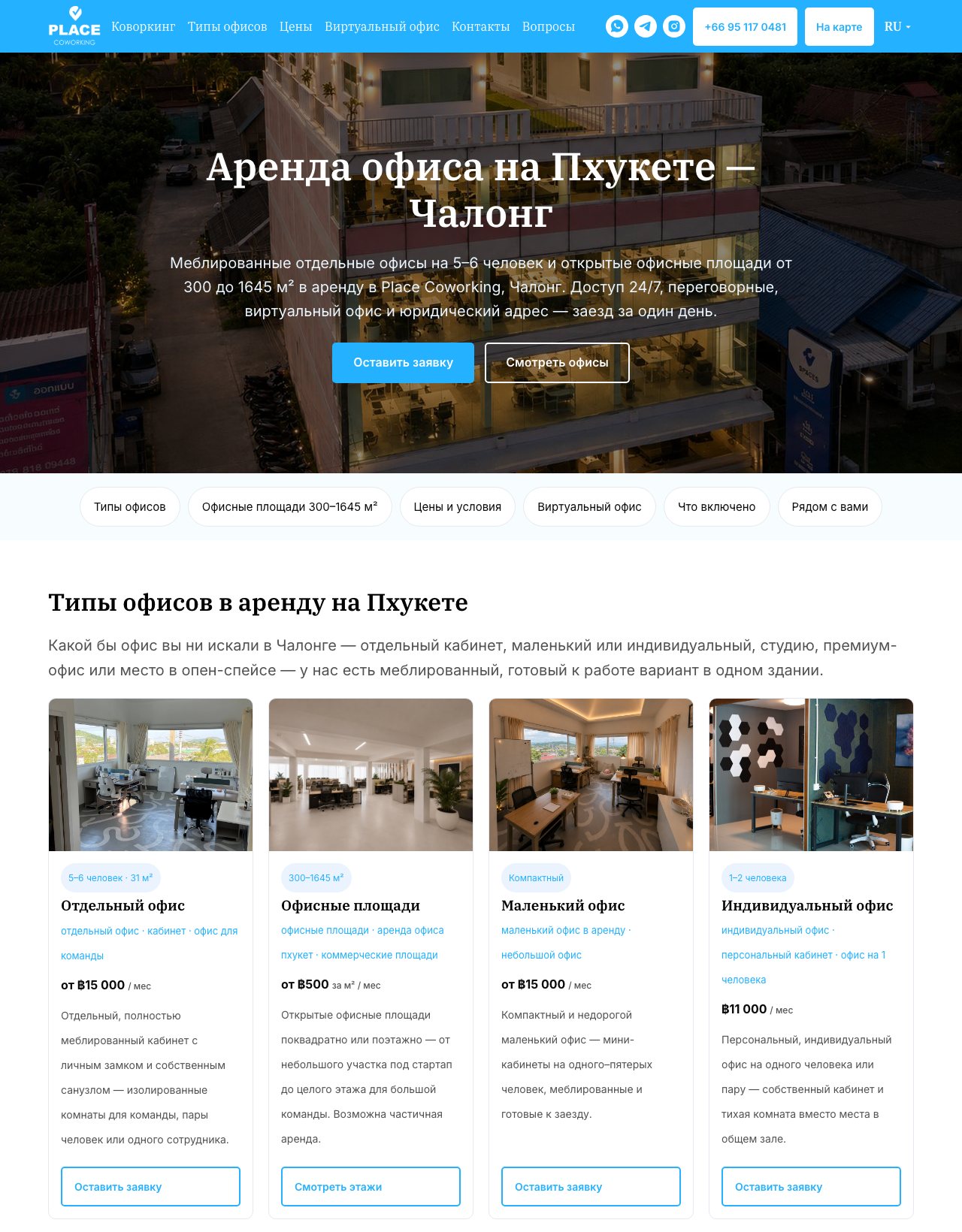
A coworking space in the south of Phuket has five floors, and besides desks it rents out separate offices: furnished rooms for 5-6 people, whole-floor spaces and a virtual office with a registered business address. But the site had no dedicated page about offices: office ads led to Google Maps, and for queries like "office for rent phuket" the search engine showed listing portals. It needed a page that both Google and AI assistants find, since expats and people relocating to the island increasingly ask AI where to rent an office there. And it had to be built into the existing Tilda site, without moving it, in two languages: English and Russian.
One page, two goals
Usually a page is built "for search": so that Google shows it for the right queries. Here there were two goals. The second, just as important to the client: getting AI assistants to name the coworking space when asked "where can I rent an office in Phuket". This field is called GEO, Generative Engine Optimization, and it works by different rules.
SEO: so Google shows the page
A search engine matches a page to search queries. It needs a structure built around real demand, copy with the words people actually search with, speed and clear markup.
GEO: so AI assistants name the client
ChatGPT, Perplexity or Alice, the AI assistant from Yandex, Russia's largest search engine, don't show ten links. They name two or three places and explain why. To make that list, an assistant needs facts that are easy to take: prices, floor area, address, terms. As plain text, not inside an image.
Step 1. Demand: 6,725 queries down to 1,657
We started with how people actually search for an office. We collected queries from four sources and cleaned out duplicates and everything that looks like office rental only in wording, not in meaning.
What we had to filter out: an office supply store chain with a similar name, office software, office furniture, queries about Bangkok and about cities in the US and the UK. Without this, "demand" for office rental would have looked several times bigger than it is, and the page would have answered the wrong people.
The remaining queries fell into six clusters, and each one got its own place on the future page.
| Cluster | Section on the page |
|---|---|
| Brand | first screen and trust block: people already search for the client by name |
| Coworking | the "coworking and flexible desks" section: a related product that catches adjacent demand |
| Office rental | the main commercial section: office types, floor areas, prices |
| Private office | a subsection about the furnished office for 5-6 people, with photos |
| Meeting rooms | the "meeting rooms and services" block with a discount for tenants |
| Business address | the "virtual office" section with three plans |
Step 2. Nine top-ranking competitors, broken down block by block
We took the pages Google shows for office rental queries and broke each one down into blocks: what is there, in what order and how prominent. The result was a map of what the search engine considers normal for this kind of page.
- Header with navigation, headline, footer, price and contact button on every card9 of 9
- Long explanatory text with subheadings7 of 9
- Inquiry form mid-page, trust block6 of 9
- FAQ with questions and answers3 of 9
- Amenity icons, "how it works", product types2 of 9
- Interactive map1 of 9
Step 3. From a list of queries to a page structure
The "office rental" cluster is not a list of words to "work into the text" but a map of what people want to know. We gave each phrase one intent, grouped the intents into blocks, and for each block defined which queries and words should represent it on the page.
The check is simple: every meaningful word from the cluster should appear on the page, and no block should repeat another. A check of the finished page showed 99% coverage.
Step 4. Two structures merged into one specification
The framework and order of blocks came from the competitors, and the content and weight of the sections from demand. The result was an annotated prototype: for each block, it says which query it covers, what it should contain and where to get the material. That is the specification the page was then built from.
We went through the prototype with the owner, and some blocks changed: 24/7 access for tenants, "choose, view, sign, move in" steps with payment and deposit, floor areas by level up to 1,645 m², and a virtual office with three plans instead of a business address as a separate service.
Step 5. Building inside the existing website
The client's site runs on Tilda, a popular website builder, and nobody planned to move it. We built the page in plain HTML and CSS and embedded it in the site as a single block. That gave us freedom in the layout and kept the domain with its search history. But the builder has its own styles and habits, and we had to work around them.
The builder's styles overrode even the highest-priority rules. We assembled the sections from plain blocks it doesn't touch.
We forced link and button colors so the page looks like the rest of the site.
We wrapped the tables in a scroll container so the page doesn't slide sideways and the text doesn't break.
We moved our floating "Get a quote" button to the bottom left corner so the two don't overlap.
A pure CSS burger menu, a header that stays fixed on scroll, and a long menu that scrolls inside it without being cut off.
We copied them one to one: fonts, the blue bar, the menu, messenger icons, the language switcher. Visitors don't see the seam.
We picked thirteen photos from the client's archive, optimized them and uploaded them to the builder's storage. The inquiry form opens in a pop-up from any button on the page, reviews are pulled from the Google profile, and the map shows the building itself. The Russian version follows the same structure, with its own copy, a language switcher and a canonical link.
What the page does for AI assistants
An AI doesn't "read" a page like a person. It looks for where to get the answer to a specific question: price, size, address, terms. The easier that is to find, the better the chance it names you in the answer.
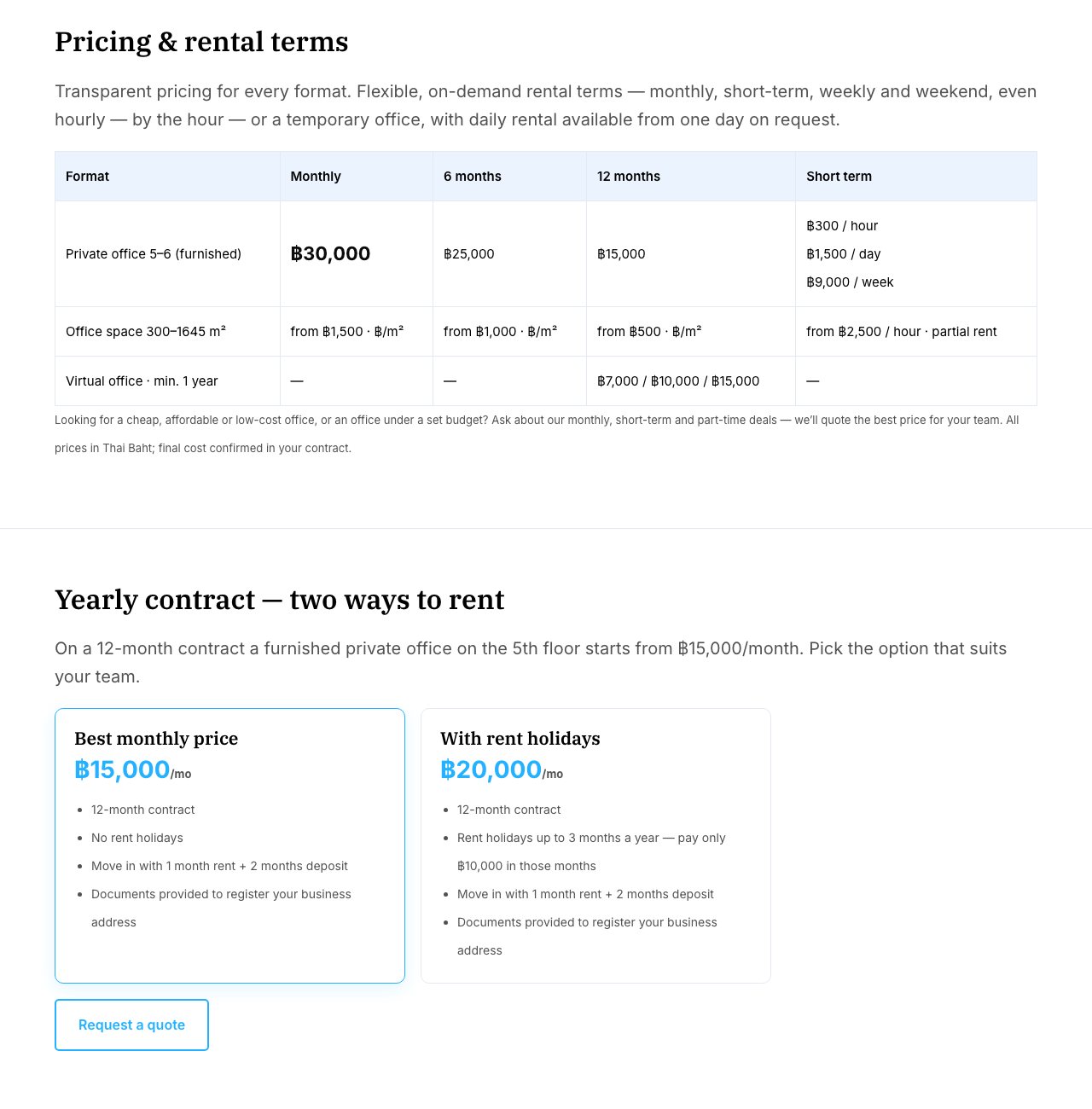
Prices per month, six months and year, floor areas by level, address, opening hours, move-in terms. Not a single important number in an image or "on request".
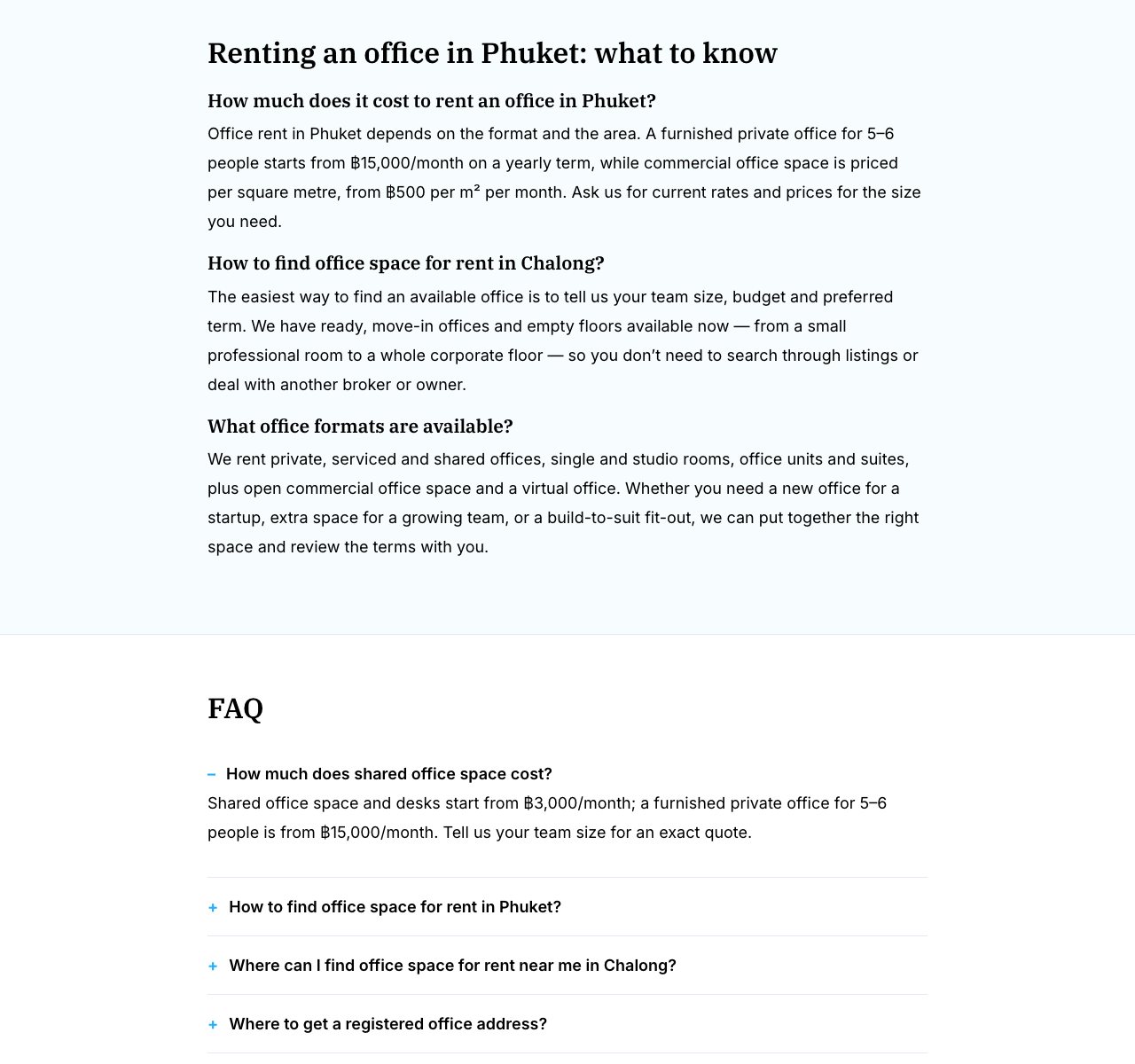
"How much does it cost to rent an office in Phuket?", "How do I find an office in Chalong?", "What formats are there?". The answer comes right under the question, in two or three sentences.
The questions come from real search queries, not invented ones. These are exactly what a person asks an AI.
An organization with address and hours (LocalBusiness), questions and answers (FAQPage), an offer with a price (Offer). Machine-readable for Google and assistants.
Chalong, distances to beaches and the airport, a map. When an assistant looks for options "in the south of the island", it finds the right one.
The English and Russian pages are linked by hreflang language pairs. The assistant answers in the language of the question and finds the same page.
What came out of it
Five weeks after publication, we asked three assistants the kind of questions a real client asks, in Russian. Not "tell me about the coworking space" but "find an office for my team".
The client comes first on the list, marked "the best ready-made option": prices by contract term, address, what is included, pros and cons. All of it taken from our page.
The client comes first among "ready-made solutions": with prices, meeting rooms and the verdict "excellent value for money".
The client's page is among the sources of the answer and in the list of five places "where to look". It is the only coworking space among real estate portals.
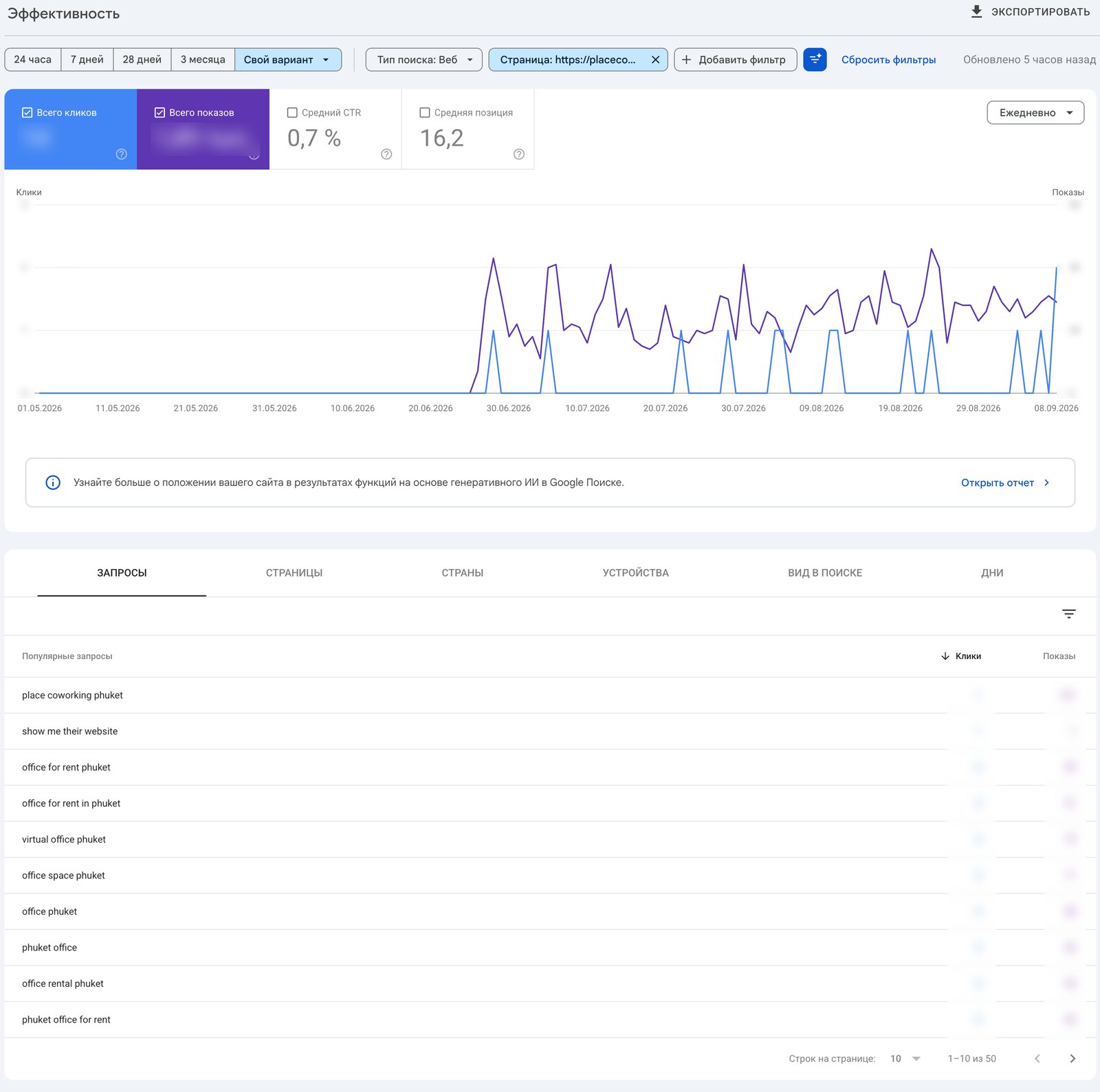
Google started showing the page for target queries within days of publication. Two and a half months later, it is visible for about fifty phrasings, and almost all of them are about office rental:
The average position is 16 for now, the second page of results. That is without a single external link and without ads pointing to the page, purely from structure, copy and markup. Next, links, a local profile and reviews will push it higher, and AI assistants already recommend it.
What we did for the office rental page
- Gathered demand from four sources: 6,725 raw queries narrowed down to 1,657 with a clear intent to rent an office and sorted into six clusters, each for its own section of the page
- Measured search volumes for Phuket province, not all of Thailand: the first check overstated demand tenfold and pointed to the wrong priorities
- Broke down nine top Google pages block by block: what everyone has, what is rare, and what office operators do differently from listing portals
- Turned a cluster of 601 phrases into a structure: one intent per phrase, intents grouped into seven blocks, each block with its own set of queries and words. The finished page covers 99% of the queries
- Merged the demand-based and competitor-based structures into one and turned it into an annotated prototype as the specification; reviewed it with the owner and made product changes
- Wrote copy with the facts stated plainly: prices by term, floor areas by level, address, hours, move-in terms. Question headings with answers under them, and an FAQ built from real phrasings
- Built the page in plain HTML and CSS and embedded it in the Tilda site as a single block: the header and footer match the site, conflicts with the builder's styles were worked around, and the mobile menu needs no scripts
- Added Schema.org markup: an organization with an address, questions and answers, an offer with a price; plus a canonical link and hreflang language pairs
- Selected and optimized 13 photos, added a pop-up inquiry form, Google reviews and a map of the building
- Built the Russian version on the same structure, with a language switcher
- Five weeks later, checked how ChatGPT, Perplexity and Yandex Alice answer client questions; two and a half months later, pulled the Search Console data
The page and how AI assistants and Google see it
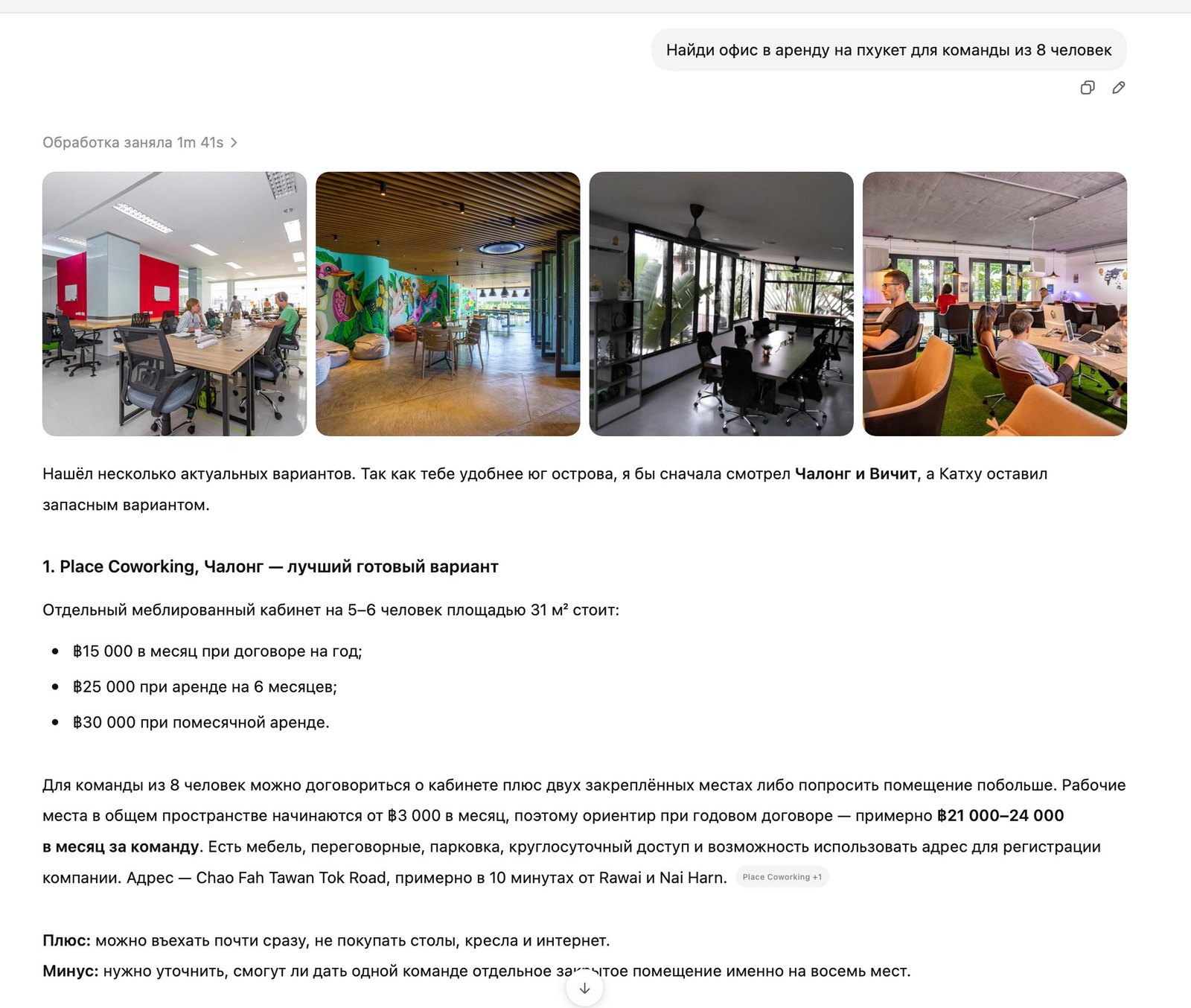
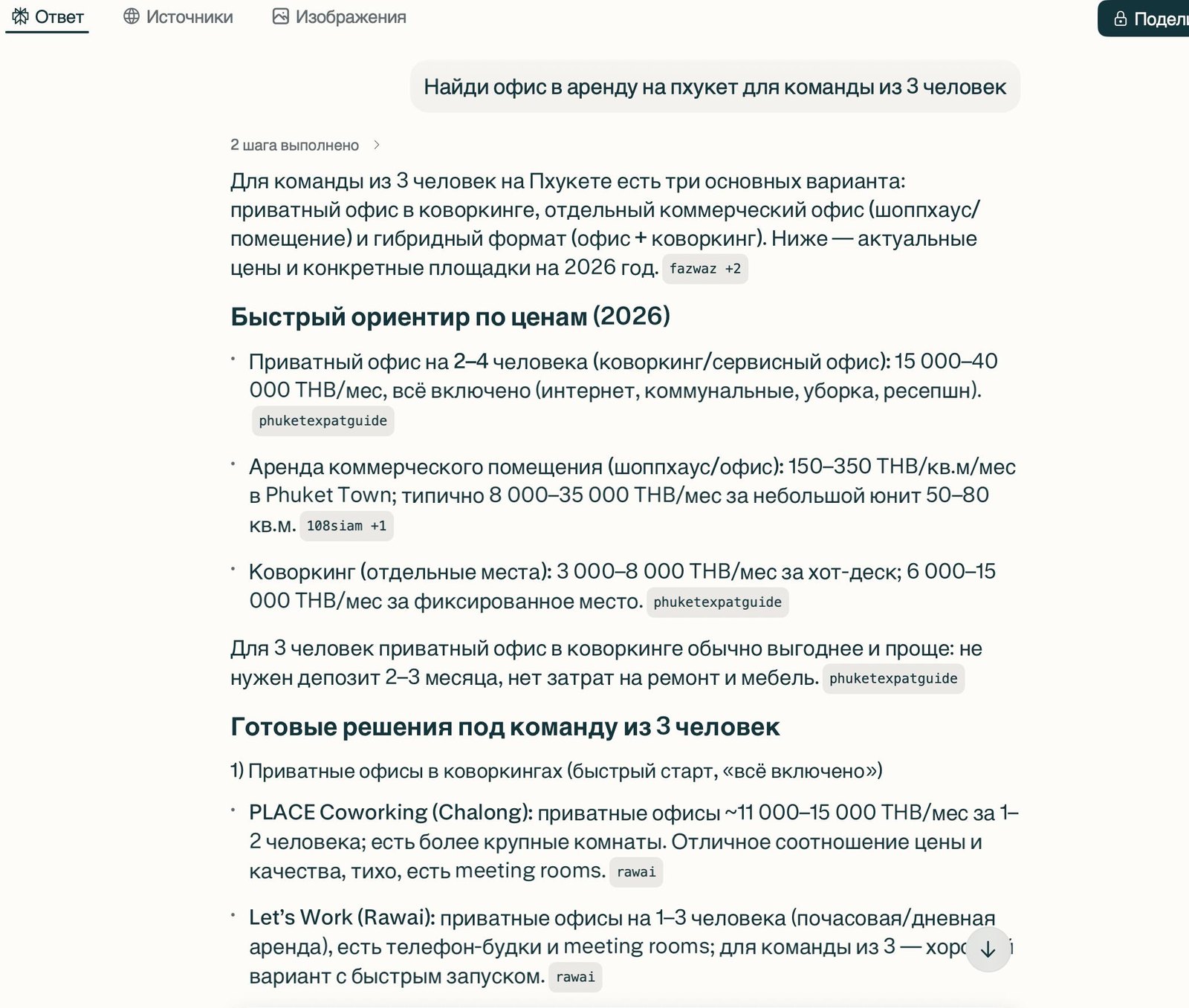
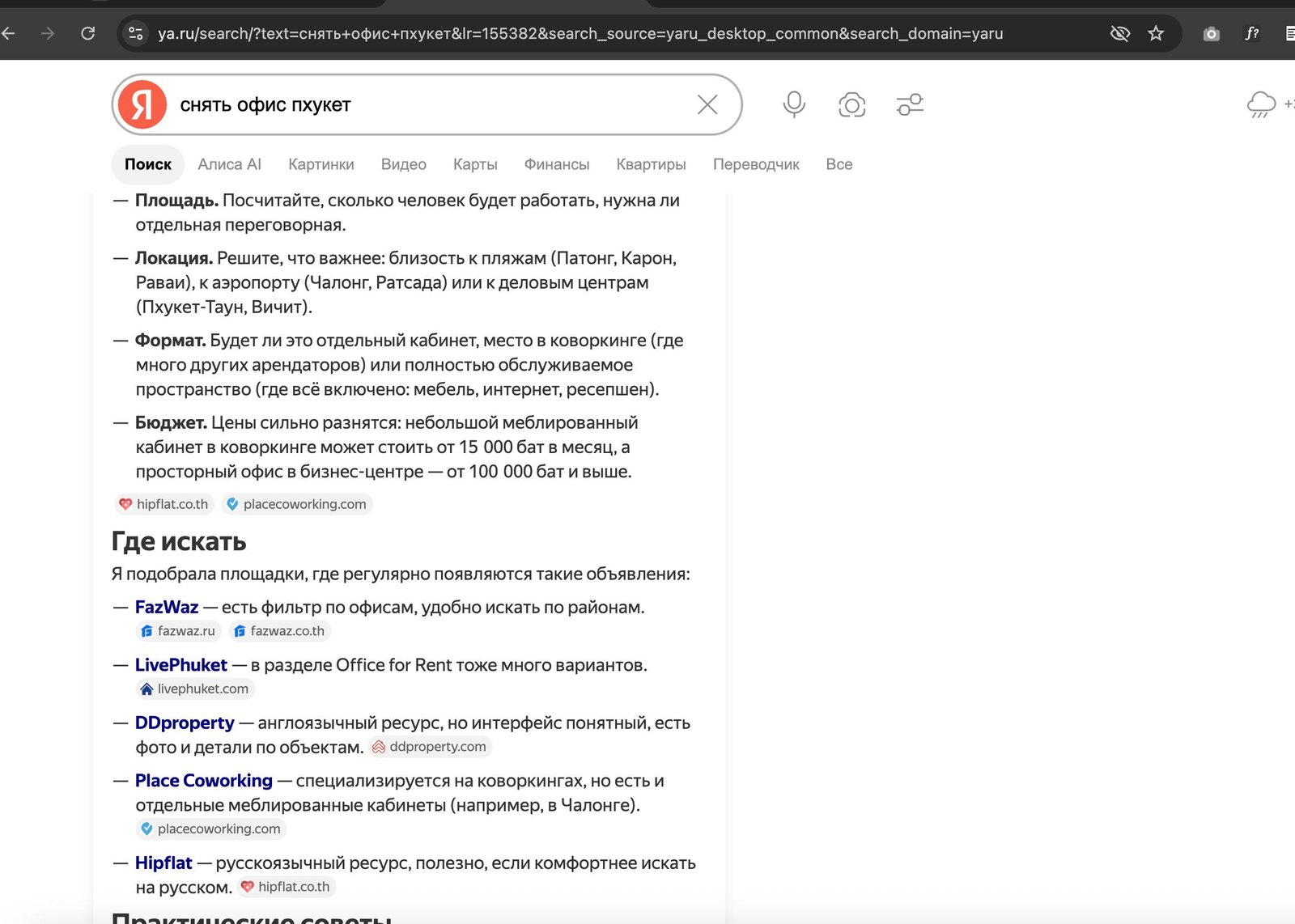
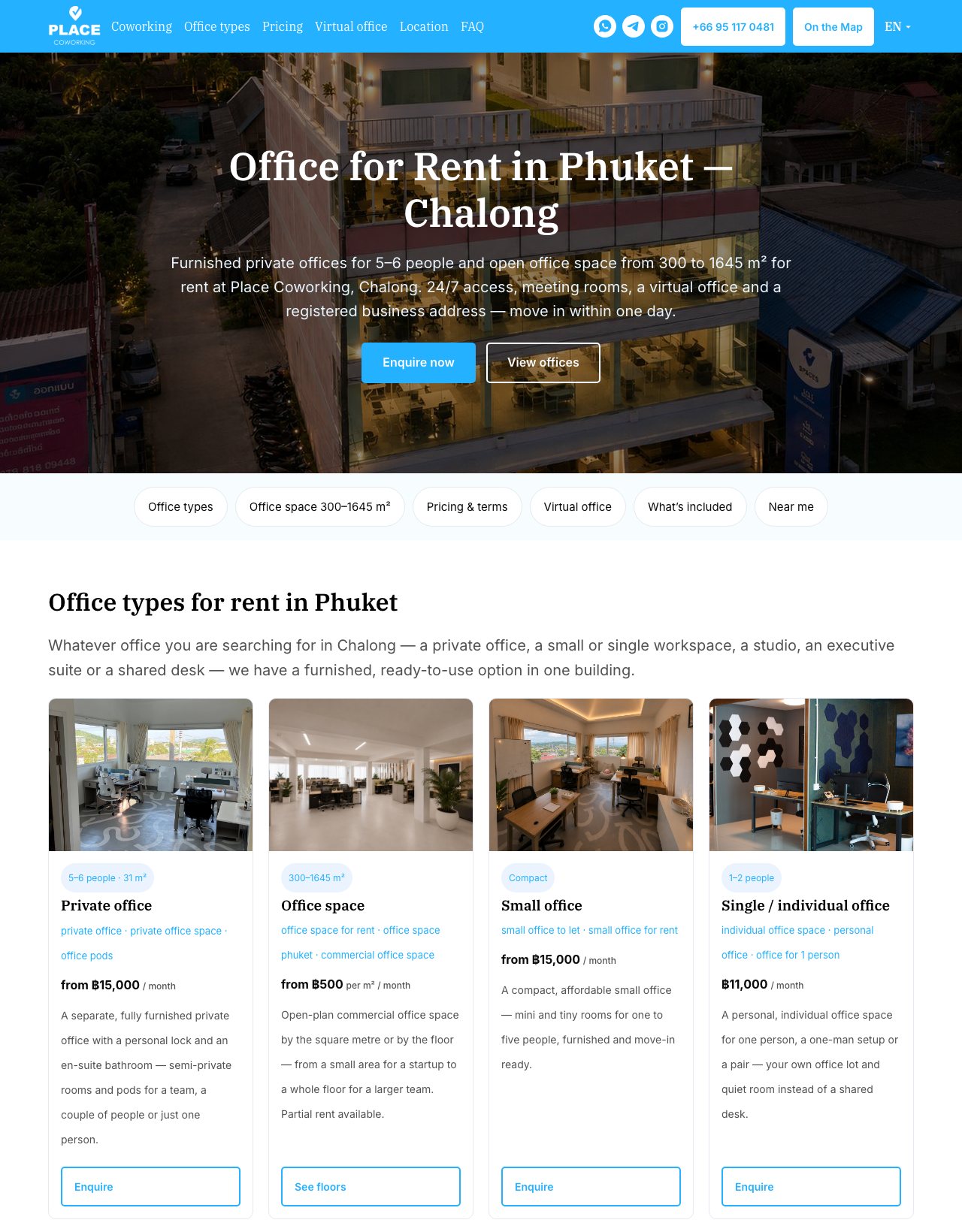
The result: ChatGPT, Perplexity and Yandex Alice recommend the coworking space
Five weeks after publication, AI assistants recommend the client. Asked about an office for a team of eight, ChatGPT puts the coworking space first as "the best ready-made option", with prices and the address from our page; Perplexity names it first among ready-made solutions for a team of three; and Yandex Alice cites the page as a source and includes it among five places to look for an office in Phuket. In Google, the page appeared for target queries within the first days, and two and a half months later it is visible for about fifty phrasings: "office for rent phuket", "office space phuket", "virtual office phuket", "office rental phuket". The average position is 16 without a single external link or any ads pointing to the page. The Russian version works on the same structure.
Checklist: will an AI assistant see your page?
Ask ChatGPT and Perplexity the way a client would: "find an office for a team of five in such-and-such area". If you are not in the answer, that is your starting point.
"On request" and a price list in an image don't exist for an assistant. At least give a "from" price with terms you stand behind.
An assistant looks for a direct answer next to the question. "How much does it cost", "where is it", "what is included" should be headings, with the answer right below.
Take the questions from real search queries instead of making them up. Schema.org markup makes them machine-readable.
Not just on the map. Plus LocalBusiness markup: assistants pick options by area and opening hours.
An assistant answers in the language of the question. If one language version is half as long as the other, clients who ask in that language get someone else's answer.
Search volumes for a whole country instead of a city overstate demand dozens of times and lead to the wrong priorities on the page.